
D365 Finance & Operations
9Arts, providescustomer centric services for business to upgradefrom Microsoft Dynamics AX 2012 or Microsoft Dynamics AX 2009 to the latest version of Dynamics 365 for Finance and Operations.
As part of 9Arts, D365 upgrade program, we deliver robust technical solutionswhich are cost-effective, scalable, flexible,adaptive and innovative with emphasis on operational excellence.
Workflow of Microsoft Dynamics 365 at 9Arts
Our upgrade plan includes a simple yet effective 3 step process
- Execute
- Validate
- Cutover,Deploy and Hypercare
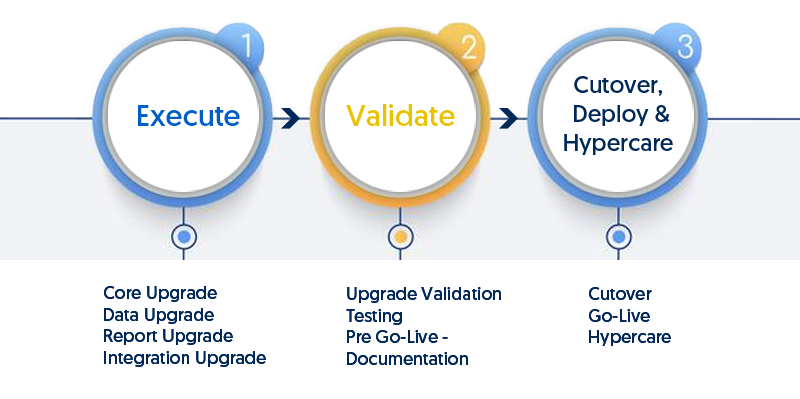
Execute
During the execute phase our team will perform any preparation tasks required for the AX environment for code, data, reports and integrations upgrade to ensure a smooth transition to D365. Additionally, the work is broken down into manageable tasks for better productivity and easier management. In addition to all the following, we also cost effectively architect integrations on as-needed basis for the client.
Our execute phase predominantly includes the following
Code Upgrade
- Installing any hotfixes required on your Microsoft Dynamics AX application to ensure a successful upgrade
- Upgrade the application
- Compile the application
- Resolve any errors
- Refactor customizations that were done with over-layering and move to extensions where possible
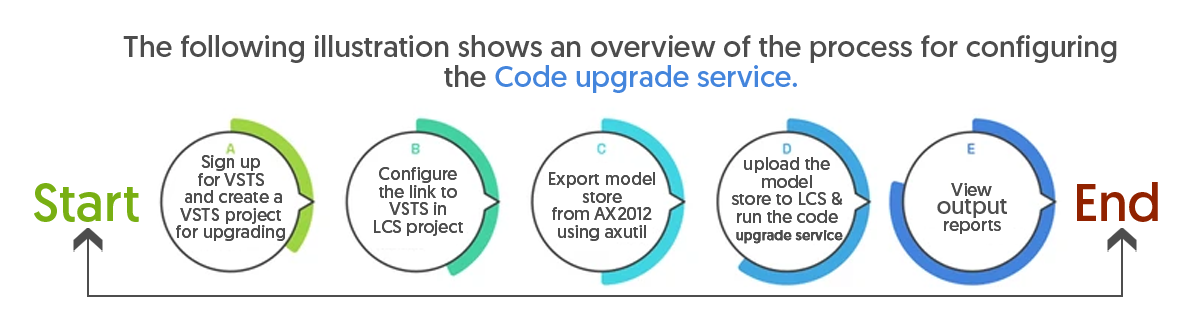
The following illustration shows an overview of the process for configuring the Code upgrade service.
Data Upgrade
- Complete the data upgrade on a development environment and do the first level validation
- Migrate the database to SQL Azure
- Execute the data upgrade on a test environment and work jointly with you to do the second level validation.
The following illustration shows an overview of the process for configuring the Data upgrade service.

Reports Upgrade
- Ensure the system meets all D365 reporting requirements.
- Migrate SSRS reports and BI cubes
- Validate migrated SSRS reports and BI cubes
- Re-develop any reports that do not meet D365 reporting requirements
Integrations Upgrade
- Assess integration transition needs
- Ensure integration meets D365 interface standards
- Re-develop any required integrations using D365 interface standards including but not limited to
- Azure Data Factory
- Azure Data Storage
- Azure Data Lake Storage
- Logic Apps
- Power Platform
- Data Flow
- Dataverse
Validate
During the validate phase, the team will be primarily focused on deploying the code to lower environments, testing and validating.
Our validate phase includes the following
Validation
- Data upgrade in Dev environment and upgrade validation
- Data upgrade in Sandbox environment and upgrade validation
Testing
- Smoke testing
- User Acceptance testing
- Cutover testing
Documentation
- Prepare cutover plan
- Create pre go-live checklist
Cutover, Deploy and Hypercare
During this phase, our team is focused in preparing for cut-over and go-live to provide a smooth and seamless transition to the new D365 environment.
The phase broadly includes the following activities
- Freeze application
- Verify operational readiness
- Final Go-Live checklist
- Finalize hyper care team
- Final data cutover
- Final code migration
- Cutover
- Go-Live
- Hypercare